 /
Office of Background Investigations / Resources / Fieldprint
/
Office of Background Investigations / Resources / Fieldprint
All DOE providers must register a new Fieldprint business account after Jan. 1, 2026. This is required to successfully send applicants for fingerprinting.
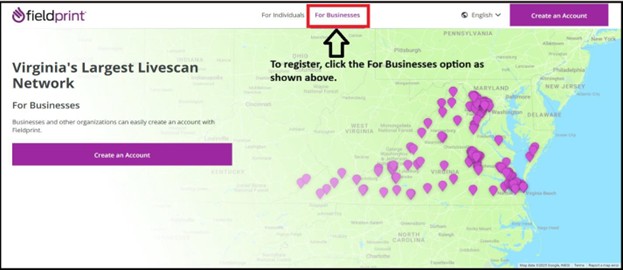
Any provider that sends applicants for a fingerprint-based criminal history check must register online with Fieldprint.
You will need your Fieldprint codes.
If you do not know your facility id or Fieldprint codes, contact the Office of Background Investigations (OBI):
Email: backgrounds@dss.virginia.gov
Use the Virginia Fieldprint business website:
Website: https://fieldprintvirginia.com/businesses
Important Payment Notice
Once you choose a payment method, you cannot change it later.
This becomes the standard payment method for your Fieldprint account.
Payment Options
You must select one option.
Option 1: Applicant Pay
The person being fingerprinted pays for the background check.
Option 2: Provider Pay
The provider pays for all fingerprint-based background checks.
Payment information is required and will remain on file.
After entering payment information, select Continue.
Additional Note About Fees
For both payment options, the credit card on file may be charged for:
After submission, you will receive an email with your account login information.
Provider Account Billing Note
Fieldprint does not invoice most provider accounts unless special circumstances apply.
If you believe you have a special situation (such as more than 1,000 applicants), contact Fieldprint directly to discuss your needs.
Applicants must have the Fieldprint code and Facility ID from the provider before scheduling.
|
Step 1: Visit the Individual Site Go to: Fieldprint Virginia (Individual)
|
Step 2: Sign In or Create an Account
|
|
Step 3: Schedule the Appointment After logging in:
|
Step 4: What you need for your appointment At the end of the process, print your Confirmation Page. Bring the following to your appointment:
|





 Find my local department